OpusClip Review 2026: AI-Powered Video Repurposing, Pricing, and 5 Alternatives
Honest OpusClip review with 2026 pricing breakdown. Compare 5 alternatives including Vidyo.ai, Descript, Riverside, Argil, and Kapwing for AI video repurposing.

- OpusClip turns long-form video into short-form clips using AI
- Free tier available with 60 credits/month and watermarked output
- Virality scoring helps prioritize clips but lacks audience personalization
- Five alternatives compared: Vidyo.ai, Descript, Riverside, Argil, Kapwing
- All clipping tools require source footage, but creation tools do not
- Argil generates short-form video from scripts using an AI clone
Looking for an honest OpusClip review before you pay for a plan? Here is the short version: OpusClip (also known as OpusPro) is one of the fastest ways to turn a long-form video into short-form clips for TikTok, YouTube Shorts, and Instagram Reels, and the pricing is straightforward once you know what each tier actually includes. It uploads and analyzes your footage, then cuts it into clips scored for engagement, so a creator drowning in content demands can save real editing time.
But does it actually deliver? This review breaks down how OpusClip works, what it costs in 2026, where it falls short, and which alternatives are worth considering depending on your workflow.
What Is OpusClip - AI-Powered Video Repurposing?
OpusClip is an AI video repurposing tool that takes long-form video and identifies the strongest moments, then generates short-form vertical clips with auto-generated captions and formatting. It solves a real bottleneck: turning a 60 minute podcast episode into 10 ready-to-post clips without sitting in an editing timeline.
The tool's primary audience is podcasters, YouTubers, course creators, and social media managers with large video archives who need to distribute content across short-form platforms consistently.
How OpusClip Works
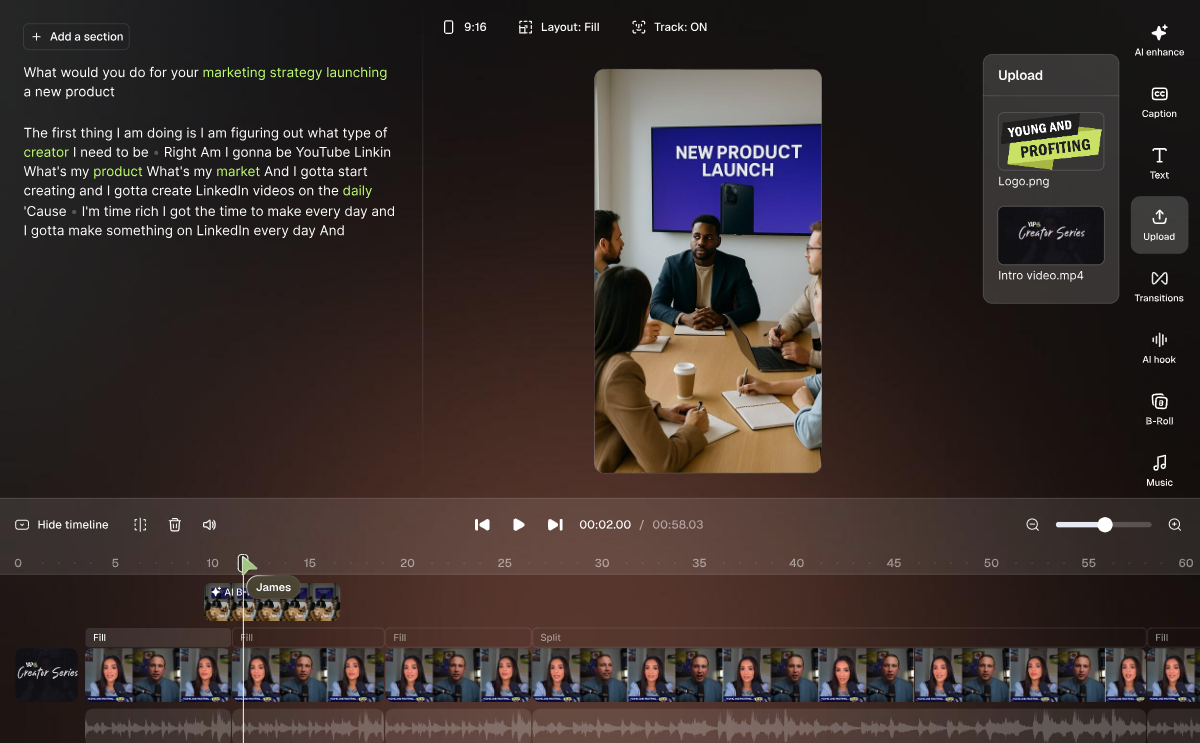
The workflow is straightforward. Upload a video file or paste a YouTube URL, and OpusClip's AI analyzes the full video for engagement peaks: hooks, strong statements, emotional moments, data points. Within minutes, clips are generated and scored with a virality score from 0-100 based on the platform's engagement prediction model.
The virality score is worth understanding. It is a proprietary metric predicting short-form engagement based on factors like hook strength, pacing, and speaker confidence. Treat it as a rough guide, not gospel. Real performance depends on your specific audience, and the algorithm scores every creator's content against the same model. A clip scoring 85 tells you it fits the model's idea of engaging, not necessarily yours.
Think of the virality score as a rough prediction of short-form engagement based on things like hook, pacing, and delivery. Image source: OpusClip
Customization options include a brand kit (logo, colors, fonts), caption style and size, aspect ratio selection (9:16, 1:1, 16:9), keyword highlighting, and start and end trimming. These are meaningful but limited compared to a full editor like Descript or Premiere Pro. On paid plans, batch processing lets you process multiple videos at once.
OpusClip Pricing in 2026
OpusClip's live pricing page currently lists four tiers:
- Free: 60 processing minutes a month. AI clipping with a watermark, 1080p max, 3-day export limit. Good for testing, not for regular use.
- Starter ($15/month): 150 processing minutes a month. Watermark removed, multi-source import (YouTube, Google Drive, Vimeo, Zoom, Rumble, StreamYard), animated captions, 1 brand template, and basic AI editing tools like speech cleanup and text-based editing. Custom reframing and clip analytics are still locked behind Pro.
- Pro ($29/month, or roughly $14.50/month billed annually): 300 processing minutes a month, 3,600 a year on the annual plan. Adds custom reframing, more AI video editing tools, a social media scheduler, and clip analytics with an automatic title and description generator. Team seats, brand template packs, Zapier, and export to Adobe Premiere Pro or DaVinci Resolve now sit behind the Business plan rather than Pro, so check the live comparison table before assuming Pro covers a whole team.
- Business (custom pricing): Team workspaces with multiple seats, SSO, API access (including Zapier and CMS integrations), export to Premiere Pro and DaVinci Resolve, and custom onboarding.
For a creator publishing 4 podcasts a month at 60 minutes each, that is 240 minutes of processing, comfortably inside the Pro plan's 300 minute cap. At $29/month flat, that works out to roughly $0.12 per minute processed, or under $1 per finished clip if each podcast yields 8 to 10 usable clips.
Honest Review: What OpusClip Gets Right and Wrong
What OpusClip Gets Right
Speed is the headline feature, and it delivers. A 60 minute podcast becomes 10 clips in under 10 minutes. Caption quality is among the best in the auto-caption market, with accurate word-level timing and clean formatting. Hook detection is reasonably good at identifying strong opening moments from conversational content.
The platform handles the tedious work well: aspect ratio conversion, caption generation, and basic formatting. For podcasters who produce weekly episodes and need a consistent supply of clips, OpusClip removes the biggest bottleneck.
What OpusClip Gets Wrong
Clips often feel generic. OpusClip optimizes for universal engagement signals, not for your specific audience or brand voice. The AI picks moments that sound impactful in isolation, but they can lack context or narrative flow when posted.
There is no personalization. OpusClip does not know your audience, your posting cadence, or what has already performed well in your feed. Every creator gets the same AI scoring model. The virality score algorithm also misses nuanced content where the value is in the buildup, not the punchline. Highly technical or educational content often gets clipped poorly.
The fundamental limitation is that OpusClip is a derivative tool. It can only produce output as good as what you already filmed. If you did not film anything this week, you have nothing to clip. Your short-form output is permanently tied to your long-form production schedule.
Best OpusClip Alternatives for AI-Powered Video Repurposing
Vidyo.ai
The most direct OpusClip alternative. Vidyo.ai (acquired and rebranded as quso.ai, though existing Vidyo.ai plans carry over unchanged) offers similar AI clipping with a stronger focus on LinkedIn and professional content. Caption quality is comparable, and the interface feels slightly more polished for B2B creators. Pricing runs from free to $49/month (Growth plan), or $33/month billed annually. Like OpusClip, it only works with footage you already have.
Descript
Descript is a transcription-first editor where you clip video by editing text, a more hands-on process that gives you real power over the result. This gives you superior control over what goes into each clip. AI features like filler word removal and studio sound actually improve source quality before clipping. Pricing starts at $16/month (Hobbyist) and $24/month (Creator). If you'd rather shape each clip yourself than trust an algorithm's cut, the extra time pays off.
Riverside Video Clipper
Built into Riverside's recording platform. If you already record podcasts or interviews in Riverside, clips are generated automatically as part of your workflow. The integration matters because there is zero extra setup. Riverside plans start at $24/month (Pro). Outside of Riverside recordings, though, this feature does not apply at all.
Argil
Argil does not clip existing content, which sets it apart from every other tool on this list. It creates net-new short-form video from scripts using your AI clone. Upload a 2 minute training video of yourself, and the platform builds a digital version of you that can deliver any script you write as a fully-edited video with captions, b-roll, and transitions.
This solves OpusClip's core problem: no source footage required. Your short-form output is no longer tied to your filming schedule, which also makes it a more consistent way to build a personal brand through video than clipping whatever you happened to film. The tradeoff is the flip side of the same coin: your AI clone is only as convincing as the 2 minute training video you feed it, and it will never capture a genuinely spontaneous reaction the way real footage can. Argil starts at $39/month (Classic, 1,500 credits), with Pro at $149/month (6,000 credits).
Kapwing
A browser based editor with AI clip suggestions, built for manual refinement rather than auto-export. Kapwing gives teams the ability to refine clips collaboratively before publishing. Pro starts at $16/month, Business at $50/month. Teams that want to sanity-check every clip before it ships tend to land here.
AI Video Repurposing vs AI Video Creation: Which Approach Fits You?
Repurposing works when you have a consistent long-form content output like a weekly podcast or monthly webinar, the source material is genuinely strong and clips well, and you have the capacity to review AI-generated clips before posting.
Creating from scratch works when you need short-form volume without a long-form content program, you want platform-specific content built for TikTok rather than clipped from YouTube, or filming is what actually holds you back from posting. An AI video creation platform like Argil removes that dependency entirely. Many creators end up doing both: repurposing what they already have while filling the gaps with AI-generated shorts.
FAQs
Is OpusClip free?
Yes. The free tier gives you 60 processing minutes a month with watermarked output at 1080p max. Clips expire after 3 days. For regular posting, you need a paid plan starting at $15/month.
How accurate is OpusClip's AI at finding the best moments?
Good for content with clear hooks and punchy statements. Weaker for nuanced educational or narrative content where context matters. Virality scores should be treated as a starting point, not a final decision on what to post.
Does OpusClip work with podcasts?
Yes, and it is one of the best use cases. Audio-dominant content with strong statements and conversational hooks clips well. OpusClip supports audio-only uploads and generates captions from transcription.
OpusClip vs Descript for clipping: which is better?
OpusClip is faster and more automated. Descript gives more control but requires more time per clip. If speed is the priority, go with OpusClip. If quality and precision matter more, Descript is worth the extra editing time.
Can OpusClip make vertical videos from horizontal footage?
Yes. OpusClip auto-reframes horizontal (16:9) footage into vertical (9:16) using AI to track the speaker and keep them centered. This works well for talking head content but less reliably for multi person or action footage.
What does OpusClip cost per month in 2026?
Plans run from free (60 minutes a month, watermarked) to $15/month (Starter, 150 minutes) to $29/month (Pro, 300 minutes), with custom Business pricing for teams that need seats, SSO, or API access.
Related Articles
- The Best Clipping Software for Content Creators in 2026
- What's New in AI Video Generation? Key Trends and Tools to Watch in 2026
- 5 Best AI Image to Video Generators for Creators in 2026
OpusClip AI video repurposing review with pricing and alternatives compared